Stop Searching, Start Finding! 🎯
With thousands of designs uploaded to CNC Hub every single week, scrolling through the feed to find that one specific "3D Bed Design" can take forever.
We realized that a professional platform needs professional search tools. That is why we built the Advanced Design Filter — a powerful, lightning-fast sorting mechanism built directly into the app's Core API!
How Does the Filter Work?
We didn't just build a simple text search. We analyzed the backend code (HomeActivity.kt and our Cloudflare API) to create a multi-layered filtering system.
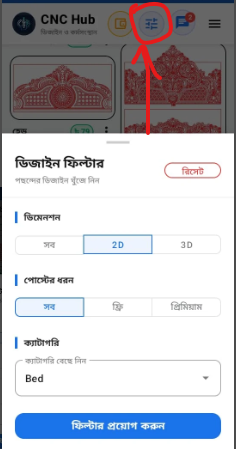
When you tap the filter icon at the top of the Home Feed, a sleek Bottom Sheet appears, allowing you to narrow down your search using three main criteria:
- Dimension (2D vs 3D): Working on a flat CNC router project? Select 2D. Need a complex STL file for carving? Select 3D. The filter instantly eliminates irrelevant dimensions.
- Post Type (Free vs Premium): Looking for some quick inspiration without spending DK Coins? Select Free. Ready to invest in a high-quality, paid design? Switch the toggle to Premium.
- Smart Categories: Looking for a Door, a Bed, or a Jali design? Just pick the exact category from the dropdown menu.
Instant API Integration
The magic happens when you hit the "Apply Filter" button. The app instantly sends your selected parameters directly to our high-speed Cloudflare backend. Within milliseconds, the API sifts through thousands of database entries and sends back only the exact designs you asked for. No lag, no page reloads—just instant results.
If you want to go back to the main feed, simply hit the "Reset" button to clear all filters.
Finding the perfect design for your CNC machine has never been this fast and easy!